Stranica: 2/7.
Re: Broken count
Postano: 08 tra 2017, 21:16
Postao/la calisto053
Imaš problem jer nisi dobro upisala naredbu. Ovdje:
Kod: Označi sve
marina@martin:~$ sudo apt-get install-f
E: Invalid operation install-f
Nisi dodala razmak. Treba biti:
Savjet: naredbe nikad ne prepisuj ručno, već kopi-pejstaj u terminal upravo zato da izbjegneš ovakve pogreške. Isto tako, nikada ne kopiraj naslijepo naredbe s neta ako ne znaš što radiš jer si možeš uništiti sustav (a ima i ljudi koju su jednostavno zlobni).
Budući da smo svi ovdje (uglavnom) pristojna i uvijek dobronamjerna ekipa trebamo i objasniti značenje tih naredbi. Radi se o dvije vezane naredbe od kojih prva osvježava popis repozitorija i instaliranih paketa u tvom sustavu, a druga popravlja neispravno instalirane pakete.
Ajmo opet dok nisi zaboravila gdje je terminal

(sad sve odjednom kopiraj i zalijepi):
Kod: Označi sve
sudo apt-get update && sudo apt-get install -f
PS: iz tvog ispisa se vidi da koristiš Ubuntu 16.10 koji ti vjerojatno izleda nekako ovako:
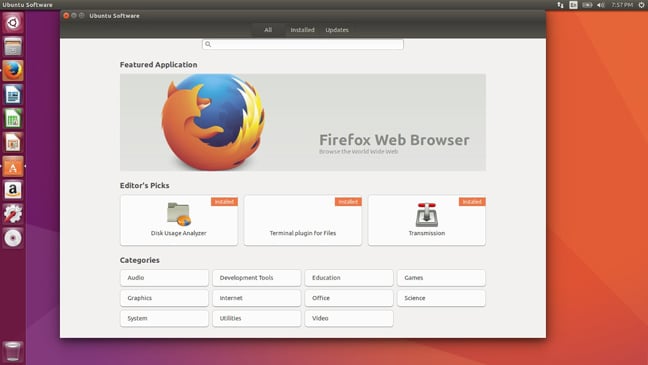
PSS: ako već nisi zadovoljna i rješila si se dečka, malo razmisli jesi li baš zadovoljna i s Ubuntuom ili bi htjela nešto bolje što te neće živcirati?

Re: Broken count
Postano: 08 tra 2017, 21:20
Postao/la Cooleech
Nestalo ti je prostora na / (root) ili /boot particiji (koji je k..linac uopće to odvajao, ako je?!).
Napravi prvo ovo što ti je i sam apt savjetovao:
Use 'sudo apt autoremove' to remove them.
Dakle, u terminalu upiši:
i onda ponovi ovo zadnje sa sudo apt-get.. bla, bla (možeš strelicama gore i dole pretraživati povijest naredbi u terminalu, ne moraš uvijek tipkat iznova).
Blio bi korisno i da nam daš ispis naredbe:
Re: Broken count
Postano: 08 tra 2017, 21:27
Postao/la Marina Gabi
Ok idem sada napraviti ovo što ste mi savjetovali pa objavim sve.
Re: Broken count
Postano: 08 tra 2017, 21:27
Postao/la calisto053
Istina, ima silne kernele 4.8.028 -> 4.8.0.40 koji joj ne trebaju. Nije problem u odvojenim particijama (ako ih ima), samo se / ili /boot malo zakrčio. A možda je popunila cijeli disk. To je čest slučaj kod žena
Dakle:
Kod: Označi sve
sudo apt-get update && sudo apt-get install -f
sudo apt autoremove
df -h
Re: Broken count
Postano: 08 tra 2017, 21:28
Postao/la Marina Gabi
calisto053 je napisao/la:Imaš problem jer nisi dobro upisala naredbu. Ovdje:
Kod: Označi sve
marina@martin:~$ sudo apt-get install-f
E: Invalid operation install-f
Nisi dodala razmak. Treba biti:
Savjet: naredbe nikad ne prepisuj ručno, već kopi-pejstaj u terminal upravo zato da izbjegneš ovakve pogreške. Isto tako, nikada ne kopiraj naslijepo naredbe s neta ako ne znaš što radiš jer si možeš uništiti sustav (a ima i ljudi koju su jednostavno zlobni).
Budući da smo svi ovdje (uglavnom) pristojna i uvijek dobronamjerna ekipa trebamo i objasniti značenje tih naredbi. Radi se o dvije vezane naredbe od kojih prva osvježava popis repozitorija i instaliranih paketa u tvom sustavu, a druga popravlja neispravno instalirane pakete.
Ajmo opet dok nisi zaboravila gdje je terminal
(sad sve odjednom kopiraj i zalijepi):
Kod: Označi sve
sudo apt-get update && sudo apt-get install -f
PS: iz tvog ispisa se vidi da koristiš Ubuntu 16.10 koji ti vjerojatno izleda nekako ovako:
PSS: ako već nisi zadovoljna i rješila si se dečka, malo razmisli jesi li baš zadovoljna i s Ubuntuom ili bi htjela nešto bolje što te neće živcirati?
PSSSS: daj mi savjet šta da koristim

i samo mi nemoj reći da si sama instaliram jer će biti onda veselja
Re: Broken count
Postano: 08 tra 2017, 21:33
Postao/la Marina Gabi
Kod: Označi sve
marina@martin:~$ sudo apt-get update && sudo apt-get install -f
[sudo] password for marina:
Hit:1 http://archive.canonical.com/ubuntu yakkety InRelease
Get:2 http://security.ubuntu.com/ubuntu yakkety-security InRelease [102 kB]
Hit:3 http://ppa.launchpad.net/nilarimogard/webupd8/ubuntu yakkety InRelease
Hit:4 http://gb.archive.ubuntu.com/ubuntu yakkety InRelease
Hit:6 http://ppa.launchpad.net/rvm/smplayer/ubuntu yakkety InRelease
Get:7 http://gb.archive.ubuntu.com/ubuntu yakkety-updates InRelease [102 kB]
Get:8 http://gb.archive.ubuntu.com/ubuntu yakkety-backports InRelease [102 kB]
Hit:5 https://debian.yeasoft.net/btsync unstable InRelease
Fetched 306 kB in 1s (254 kB/s)
Reading package lists... Done
W: http://debian.yeasoft.net/btsync/dists/unstable/InRelease: Signature by key 06ABBEA18548527F04A2FC2840FC0CD26BF18B15 uses weak digest algorithm (SHA1)
Reading package lists... Done
Building dependency tree
Reading state information... Done
Correcting dependencies... Done
The following packages were automatically installed and are no longer required:
  linux-headers-4.8.0-28 linux-headers-4.8.0-28-generic linux-headers-4.8.0-30
  linux-headers-4.8.0-30-generic linux-headers-4.8.0-32
  linux-headers-4.8.0-32-generic linux-headers-4.8.0-34
  linux-headers-4.8.0-34-generic linux-headers-4.8.0-37
  linux-headers-4.8.0-37-generic linux-headers-4.8.0-39
  linux-headers-4.8.0-39-generic linux-headers-4.8.0-40
  linux-headers-4.8.0-40-generic linux-image-4.8.0-28-generic
  linux-image-4.8.0-30-generic linux-image-4.8.0-32-generic
  linux-image-4.8.0-34-generic linux-image-4.8.0-37-generic
  linux-image-4.8.0-39-generic linux-image-4.8.0-40-generic
  linux-image-extra-4.8.0-28-generic linux-image-extra-4.8.0-30-generic
  linux-image-extra-4.8.0-32-generic linux-image-extra-4.8.0-34-generic
  linux-image-extra-4.8.0-37-generic linux-image-extra-4.8.0-39-generic
  linux-image-extra-4.8.0-40-generic linux-tools-4.8.0-28
  linux-tools-4.8.0-28-generic linux-tools-4.8.0-30
  linux-tools-4.8.0-30-generic linux-tools-4.8.0-32
  linux-tools-4.8.0-32-generic linux-tools-4.8.0-34
  linux-tools-4.8.0-34-generic linux-tools-4.8.0-37
  linux-tools-4.8.0-37-generic linux-tools-4.8.0-39
  linux-tools-4.8.0-39-generic linux-tools-4.8.0-40
  linux-tools-4.8.0-40-generic
Use 'sudo apt autoremove' to remove them.
The following additional packages will be installed:
  linux-image-4.8.0-46-generic
Suggested packages:
  fdutils linux-doc-4.8.0 | linux-source-4.8.0
The following NEW packages will be installed
  linux-image-4.8.0-46-generic
0 to upgrade, 1 to newly install, 0 to remove and 16 not to upgrade.
11 not fully installed or removed.
Need to get 0 B/21.9 MB of archives.
After this operation, 52.2 MB of additional disk space will be used.
Do you want to continue? [Y/n] Y
(Reading database ... 501899 files and directories currently installed.)
Preparing to unpack .../linux-image-4.8.0-46-generic_4.8.0-46.49_i386.deb ...
Examining /etc/kernel/preinst.d/
run-parts: executing /etc/kernel/preinst.d/intel-microcode 4.8.0-46-generic /boot/vmlinuz-4.8.0-46-generic
Done.
Unpacking linux-image-4.8.0-46-generic (4.8.0-46.49) ...
dpkg: error processing archive /var/cache/apt/archives/linux-image-4.8.0-46-generic_4.8.0-46.49_i386.deb (--unpack):
 cannot copy extracted data for './boot/abi-4.8.0-46-generic' to '/boot/abi-4.8.0-46-generic.dpkg-new': failed to write (No space left on device)
No apport report written because the error message indicates a disk full error
                                                                              Examining /etc/kernel/postrm.d .
dpkg-deb: error: subprocess paste was killed by signal (Broken pipe)
run-parts: executing /etc/kernel/postrm.d/initramfs-tools 4.8.0-46-generic /boot/vmlinuz-4.8.0-46-generic
run-parts: executing /etc/kernel/postrm.d/zz-update-grub 4.8.0-46-generic /boot/vmlinuz-4.8.0-46-generic
Errors were encountered while processing:
 /var/cache/apt/archives/linux-image-4.8.0-46-generic_4.8.0-46.49_i386.deb
E: Sub-process /usr/bin/dpkg returned an error code (1)
marina@martin:~$ sudo apt autoremove
[sudo] password for marina:
Reading package lists... Done
Building dependency tree
Reading state information... Done
You might want to run ‘apt-get -f install’ to correct these.
The following packages have unmet dependencies.
 linux-image-extra-4.8.0-46-generic : Depends: linux-image-4.8.0-46-generic but it is not installed
 linux-image-generic : Depends: linux-image-4.8.0-46-generic but it is not installed
E: Unmet dependencies. Try using -f.
marina@martin:~$ sudo apt-get update && sudo apt-get install -f
Hit:1 http://archive.canonical.com/ubuntu yakkety InRelease
Get:2 http://security.ubuntu.com/ubuntu yakkety-security InRelease [102 kB]
Hit:3 http://gb.archive.ubuntu.com/ubuntu yakkety InRelease
Hit:4 http://ppa.launchpad.net/nilarimogard/webupd8/ubuntu yakkety InRelease
Get:6 http://gb.archive.ubuntu.com/ubuntu yakkety-updates InRelease [102 kB]
Hit:7 http://ppa.launchpad.net/rvm/smplayer/ubuntu yakkety InRelease
Get:8 http://gb.archive.ubuntu.com/ubuntu yakkety-backports InRelease [102 kB]
Hit:5 https://debian.yeasoft.net/btsync unstable InRelease
Fetched 306 kB in 1s (249 kB/s)
Reading package lists... Done
W: http://debian.yeasoft.net/btsync/dists/unstable/InRelease: Signature by key 06ABBEA18548527F04A2FC2840FC0CD26BF18B15 uses weak digest algorithm (SHA1)
Reading package lists... Done
Building dependency tree
Reading state information... Done
Correcting dependencies... Done
The following packages were automatically installed and are no longer required:
  linux-headers-4.8.0-28 linux-headers-4.8.0-28-generic linux-headers-4.8.0-30
  linux-headers-4.8.0-30-generic linux-headers-4.8.0-32
  linux-headers-4.8.0-32-generic linux-headers-4.8.0-34
  linux-headers-4.8.0-34-generic linux-headers-4.8.0-37
  linux-headers-4.8.0-37-generic linux-headers-4.8.0-39
  linux-headers-4.8.0-39-generic linux-headers-4.8.0-40
  linux-headers-4.8.0-40-generic linux-image-4.8.0-28-generic
  linux-image-4.8.0-30-generic linux-image-4.8.0-32-generic
  linux-image-4.8.0-34-generic linux-image-4.8.0-37-generic
  linux-image-4.8.0-39-generic linux-image-4.8.0-40-generic
  linux-image-extra-4.8.0-28-generic linux-image-extra-4.8.0-30-generic
  linux-image-extra-4.8.0-32-generic linux-image-extra-4.8.0-34-generic
  linux-image-extra-4.8.0-37-generic linux-image-extra-4.8.0-39-generic
  linux-image-extra-4.8.0-40-generic linux-tools-4.8.0-28
  linux-tools-4.8.0-28-generic linux-tools-4.8.0-30
  linux-tools-4.8.0-30-generic linux-tools-4.8.0-32
  linux-tools-4.8.0-32-generic linux-tools-4.8.0-34
  linux-tools-4.8.0-34-generic linux-tools-4.8.0-37
  linux-tools-4.8.0-37-generic linux-tools-4.8.0-39
  linux-tools-4.8.0-39-generic linux-tools-4.8.0-40
  linux-tools-4.8.0-40-generic
Use 'sudo apt autoremove' to remove them.
The following additional packages will be installed:
  linux-image-4.8.0-46-generic
Suggested packages:
  fdutils linux-doc-4.8.0 | linux-source-4.8.0
The following NEW packages will be installed
  linux-image-4.8.0-46-generic
0 to upgrade, 1 to newly install, 0 to remove and 16 not to upgrade.
11 not fully installed or removed.
Need to get 0 B/21.9 MB of archives.
After this operation, 52.2 MB of additional disk space will be used.
Do you want to continue? [Y/n] Y
(Reading database ... 501899 files and directories currently installed.)
Preparing to unpack .../linux-image-4.8.0-46-generic_4.8.0-46.49_i386.deb ...
Examining /etc/kernel/preinst.d/
run-parts: executing /etc/kernel/preinst.d/intel-microcode 4.8.0-46-generic /boot/vmlinuz-4.8.0-46-generic
Done.
Unpacking linux-image-4.8.0-46-generic (4.8.0-46.49) ...
dpkg: error processing archive /var/cache/apt/archives/linux-image-4.8.0-46-generic_4.8.0-46.49_i386.deb (--unpack):
 cannot copy extracted data for './boot/abi-4.8.0-46-generic' to '/boot/abi-4.8.0-46-generic.dpkg-new': failed to write (No space left on device)
No apport report written because the error message indicates a disk full error
                                                                              dpkg-deb: error: subprocess paste was killed by signal (Broken pipe)
Examining /etc/kernel/postrm.d .
run-parts: executing /etc/kernel/postrm.d/initramfs-tools 4.8.0-46-generic /boot/vmlinuz-4.8.0-46-generic
run-parts: executing /etc/kernel/postrm.d/zz-update-grub 4.8.0-46-generic /boot/vmlinuz-4.8.0-46-generic
Errors were encountered while processing:
 /var/cache/apt/archives/linux-image-4.8.0-46-generic_4.8.0-46.49_i386.deb
E: Sub-process /usr/bin/dpkg returned an error code (1)
marina@martin:~$
*** Edit by Cooleech:
uklonjeni dupli code tagovi.
Re: Broken count
Postano: 08 tra 2017, 21:33
Postao/la Cooleech
calisto053 je napisao/la:Istina, ima silne kernele 4.8.028 -> 4.8.0.40 koji joj ne trebaju. Nije problem u odvojenim particijama (ako ih ima), samo se / ili /boot malo zakrčio. A možda je popunila cijeli disk. To je čest slučaj kod žena
Dakle:
Kod: Označi sve
sudo apt-get update && sudo apt-get install -f
sudo apt autoremove
df -h
Krivi redoslijed, calisto! Kako će išta instalirat ako je disk full?
Dakle, prvo:
pa onda:
Kod: Označi sve
sudo apt-get update && sudo apt-get install -f
Re: Broken count
Postano: 08 tra 2017, 21:37
Postao/la Marina Gabi
Kod: Označi sve
[code]marina@martin:~$ df -h
Filesystem                         Size  Used Avail Use% Mounted on
udev                               1.9G     0  1.9G   0% /dev
tmpfs                              392M   12M  381M   3% /run
/dev/mapper/ubuntu--mate--vg-root  683G   22G  627G   4% /
tmpfs                              2.0G  355M  1.6G  19% /dev/shm
tmpfs                              5.0M  4.0K  5.0M   1% /run/lock
tmpfs                              2.0G     0  2.0G   0% /sys/fs/cgroup
/dev/sda1                          472M  468M     0 100% /boot
tmpfs                              392M   56K  392M   1% /run/user/1000
marina@martin:~$
[/code]
Re: Broken count
Postano: 08 tra 2017, 21:40
Postao/la Cooleech
Dakle, bio sam u pravu:
Ex dečko ti je.. khm, khm. Boot particija ti je 100% full!
Prvo moraš napravit ovo:
Re: Broken count
Postano: 08 tra 2017, 21:41
Postao/la Marina Gabi
Cooleech je napisao/la:calisto053 je napisao/la:Istina, ima silne kernele 4.8.028 -> 4.8.0.40 koji joj ne trebaju. Nije problem u odvojenim particijama (ako ih ima), samo se / ili /boot malo zakrčio. A možda je popunila cijeli disk. To je čest slučaj kod žena
Dakle:
Kod: Označi sve
sudo apt-get update && sudo apt-get install -f
sudo apt autoremove
df -h
Krivi redoslijed, calisto! Kako će išta instalirat ako je disk full?
Dakle, prvo:
pa onda:
Kod: Označi sve
sudo apt-get update && sudo apt-get install -f
evo ga Cool
eech što sam napravila po tvom savjetu i što je ispalo :
Kod: Označi sve
marina@martin:~$ sudo apt autoremove
[sudo] password for marina:
Reading package lists... Done
Building dependency tree
Reading state information... Done
You might want to run ‘apt-get -f install’ to correct these.
The following packages have unmet dependencies.
 linux-image-extra-4.8.0-46-generic : Depends: linux-image-4.8.0-46-generic but it is not installed
 linux-image-generic : Depends: linux-image-4.8.0-46-generic but it is not installed
E: Unmet dependencies. Try using -f.
marina@martin:~$ sudo apt-get update && sudo apt-get install -f
Hit:1 http://archive.canonical.com/ubuntu yakkety InRelease
Hit:3 http://ppa.launchpad.net/nilarimogard/webupd8/ubuntu yakkety InRelease
Hit:4 http://gb.archive.ubuntu.com/ubuntu yakkety InRelease
Hit:5 http://ppa.launchpad.net/rvm/smplayer/ubuntu yakkety InRelease
Get:6 http://gb.archive.ubuntu.com/ubuntu yakkety-updates InRelease [102 kB]
Get:7 http://security.ubuntu.com/ubuntu yakkety-security InRelease [102 kB]
Get:8 http://gb.archive.ubuntu.com/ubuntu yakkety-backports InRelease [102 kB]
Hit:2 https://debian.yeasoft.net/btsync unstable InRelease
Get:9 http://gb.archive.ubuntu.com/ubuntu yakkety-updates/main i386 DEP-11 Metadata [146 kB]
Get:10 http://security.ubuntu.com/ubuntu yakkety-security/main i386 DEP-11 Metadata [10.9 kB]
Get:11 http://gb.archive.ubuntu.com/ubuntu yakkety-updates/main DEP-11 64x64 Icons [87.2 kB]
Get:12 http://security.ubuntu.com/ubuntu yakkety-security/main DEP-11 64x64 Icons [15.7 kB]
Get:13 http://security.ubuntu.com/ubuntu yakkety-security/universe i386 DEP-11 Metadata [18.7 kB]
Get:14 http://security.ubuntu.com/ubuntu yakkety-security/universe DEP-11 64x64 Icons [18.4 kB]
Get:15 http://gb.archive.ubuntu.com/ubuntu yakkety-updates/universe i386 DEP-11 Metadata [119 kB]
Get:16 http://gb.archive.ubuntu.com/ubuntu yakkety-updates/universe DEP-11 64x64 Icons [146 kB]
Get:17 http://gb.archive.ubuntu.com/ubuntu yakkety-backports/main i386 DEP-11 Metadata [3,328 B]
Fetched 871 kB in 2s (364 kB/s)
Reading package lists... Done
W: http://debian.yeasoft.net/btsync/dists/unstable/InRelease: Signature by key 06ABBEA18548527F04A2FC2840FC0CD26BF18B15 uses weak digest algorithm (SHA1)
Reading package lists... Done
Building dependency tree
Reading state information... Done
Correcting dependencies... Done
The following packages were automatically installed and are no longer required:
  linux-headers-4.8.0-28 linux-headers-4.8.0-28-generic linux-headers-4.8.0-30
  linux-headers-4.8.0-30-generic linux-headers-4.8.0-32
  linux-headers-4.8.0-32-generic linux-headers-4.8.0-34
  linux-headers-4.8.0-34-generic linux-headers-4.8.0-37
  linux-headers-4.8.0-37-generic linux-headers-4.8.0-39
  linux-headers-4.8.0-39-generic linux-headers-4.8.0-40
  linux-headers-4.8.0-40-generic linux-image-4.8.0-28-generic
  linux-image-4.8.0-30-generic linux-image-4.8.0-32-generic
  linux-image-4.8.0-34-generic linux-image-4.8.0-37-generic
  linux-image-4.8.0-39-generic linux-image-4.8.0-40-generic
  linux-image-extra-4.8.0-28-generic linux-image-extra-4.8.0-30-generic
  linux-image-extra-4.8.0-32-generic linux-image-extra-4.8.0-34-generic
  linux-image-extra-4.8.0-37-generic linux-image-extra-4.8.0-39-generic
  linux-image-extra-4.8.0-40-generic linux-tools-4.8.0-28
  linux-tools-4.8.0-28-generic linux-tools-4.8.0-30
  linux-tools-4.8.0-30-generic linux-tools-4.8.0-32
  linux-tools-4.8.0-32-generic linux-tools-4.8.0-34
  linux-tools-4.8.0-34-generic linux-tools-4.8.0-37
  linux-tools-4.8.0-37-generic linux-tools-4.8.0-39
  linux-tools-4.8.0-39-generic linux-tools-4.8.0-40
  linux-tools-4.8.0-40-generic
Use 'sudo apt autoremove' to remove them.
The following additional packages will be installed:
  linux-image-4.8.0-46-generic
Suggested packages:
  fdutils linux-doc-4.8.0 | linux-source-4.8.0
The following NEW packages will be installed
  linux-image-4.8.0-46-generic
0 to upgrade, 1 to newly install, 0 to remove and 16 not to upgrade.
11 not fully installed or removed.
Need to get 0 B/21.9 MB of archives.
After this operation, 52.2 MB of additional disk space will be used.
Do you want to continue? [Y/n] Y
(Reading database ... 501899 files and directories currently installed.)
Preparing to unpack .../linux-image-4.8.0-46-generic_4.8.0-46.49_i386.deb ...
Examining /etc/kernel/preinst.d/
run-parts: executing /etc/kernel/preinst.d/intel-microcode 4.8.0-46-generic /boot/vmlinuz-4.8.0-46-generic
Done.
Unpacking linux-image-4.8.0-46-generic (4.8.0-46.49) ...
dpkg: error processing archive /var/cache/apt/archives/linux-image-4.8.0-46-generic_4.8.0-46.49_i386.deb (--unpack):
 cannot copy extracted data for './boot/abi-4.8.0-46-generic' to '/boot/abi-4.8.0-46-generic.dpkg-new': failed to write (No space left on device)
No apport report written because the error message indicates a disk full error
                                                                              dpkg-deb: error: subprocess paste was killed by signal (Broken pipe)
Examining /etc/kernel/postrm.d .
run-parts: executing /etc/kernel/postrm.d/initramfs-tools 4.8.0-46-generic /boot/vmlinuz-4.8.0-46-generic
run-parts: executing /etc/kernel/postrm.d/zz-update-grub 4.8.0-46-generic /boot/vmlinuz-4.8.0-46-generic
Errors were encountered while processing:
 /var/cache/apt/archives/linux-image-4.8.0-46-generic_4.8.0-46.49_i386.deb
E: Sub-process /usr/bin/dpkg returned an error code (1)
marina@martin:~$
*** Edit by Cooleech:
OPET ispravljeni dupli code tagovi i moj nick.
